Make it harder for scammers to contact you or steal your identity. This checklist provides practical steps to make you and your family safer.
Have questions about the checklist? Is there something you need help with? Please reach out!
Why this is important: If you don’t hear the call, you’ll be less likely to engage. You should let all calls not in your contacts go directly to voicemail. If someone leaves a message, you can decide whether to respond.
Why this is important: If you understand how scams work, you’ll be much more likely to shut a scam down before you lose any money or have your identity stolen.
Take 30 minutes to watch a series of very good videos that cover how social engineering works and common scams using real life scenarios.
Why this is important: Adding a number lock or line lock or similar on your cell phone account is important to prevent SIM swapping. This is when someone steals your phone number but not necessarily your phone. A scammer could call your phone carrier, and through social engineering, convince a representative to move your phone number from your phone to their phone. You can stop this by not allowing the phone number to be transferred without your express permission. Just about every phone carrier has a number lock setting although it may be called something different.
Google the following to get started and follow the instructions for your carrier: “<Your phone carrier> number lock“
Why this is important: Text messages and emails can look legitimate, but they may be fake. Never trust any unexpected communication, especially from banking sites, government sites, Apple/Google/Microsoft, and commerce sites.
Consider downloading a phone app that can help you detect scam messages. Download RangersAI
Several web sites are also available where you can paste in a message and get information about how legitimate the message is:
Why this is important: This small download utility will block all screen sharing software being downloaded to your computer. If you accidentally become involved in a tech support scam, this download will protect you.
Why this is important: Scammers love getting into your bank accounts. Once they get in, they can steal all your money. You can protect your accounts by using a strong password and setting up 2FA. In addition, you need to be careful HOW you communicate with your bank. A general rule of thumb is if the bank calls, texts, or emails you, don’t respond right away. Instead, you contact the bank in one of three ways:
- Login to your bank account
- Call the number on the back of your bank card. That’s the ONLY number to use.
- Visit your bank in person
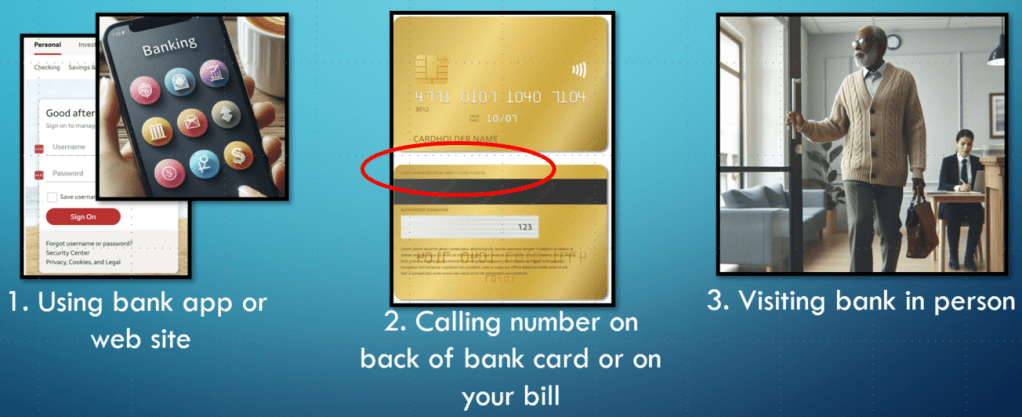
If you get a text or email message from your bank, do not respond. Use one of the three ways above to verify. If you get a phone call from your bank, hang up. Use one of the three ways above to check whether some action is needed.
Your action item is to set alerts on all your bank accounts. Alerts typically can be texts or emails. You should consider setting an alert anytime a transaction is made (anything above $0). Why this is important: you’ll know right away if an unexpected transaction is made and whether it is legitimate. If a scammer contacts you about your bank account, you’ll already know what’s going on. While on your bank app or using their web site, look for settings for an account. You should have an option to set alerts.
Why this is important: The consumer alerts email provides information on current scams. Emails typically come once or twice a week.
Sign up for FTC consumer alerts
You can also sign up for AARP Fraud Watchdog Alerts. These alerts break down current scams and discuss the common script used during the scam. You do not need to be an AARP member, but you do need to create an account.
Why this is important: If you use the same password on multiple sites, and your credentials are breached on one site, scammers can easily get access to all your other sites using the same password. At a minimum, have unique passwords for your financial accounts, email accounts, and ecommerce sites like Amazon.
Watch Secure Your Most important Accounts by Ask Leo!
Are you ready to use a password manager? Why Password Managers Are [Still] Safer than the Alternatives
Why this is important: Scammers may have access to your username and password for an account. Two-factor authentication is a second check to make sure access is legitimate. 2FA is usually based on something you have such as a phone or email address. You should have 2FA on any account that accesses your money, where you may have stored a credit card, and email accounts. Typically, you log into an account, look for settings or security, and follow any instructions for adding 2FA. Remember, any 2FA is better than no 2FA.
Read more 2FA in the 2FA Security Guide (PDF)
Here are a couple of helpful videos:
How Two-Factor Authentication Works and Why You Need It Right Now
Two-Factor Authentication – It’s Not as Complicated as you Think
Why this is important: Freezing your credit reports is extremely important to protect yourself from identity theft, fraud, and unauthorized access to your credit files. Freezing your reports does not impact your credit card. You can easily unfreeze your credit reports if you need to.
Note: freezing your credit reports is free. You do not need to pay for any services. Decline any options that require a fee.
Using 3Bfreeze to freeze your credit reports
Instructions for freezing your credit reports (frozenpii.com) – includes some more advanced options
Why this is important: Scammers can personalize scams to make them more realistic. They will google your name and city to see what results they get.
In a browser search bar, type your name, city, and the word “address”. Ex. Jane Doe New York City address
Surprised by the results? Data aggregators collect your information and sell it. They also put it online. You can request data aggregators to remove your name, and you will need to regularly check that your name stays off any lists. There are hundreds of sites where your name might be found, so one option is to pay for a service that specializes in removing data.
If you live in California, you can add your name to the Delete Request and Opt-out Platform (DROP). It’s free! This program started on August 1, 2026 and is different than the Do Not Call Registry. Delete Request and Opt-out Platform (DROP) – privacy.ca.gov
Why this is important: Scammers can gather information about you if your Facebook page is public. They can learn about who you are, who your friends and family are, where you live, etc. They can use this information to make scams seems more realistic. You can still use Facebook, but you can keep your pages more private so that only your connections can see and interact with your pages.
To get to your settings, click or tap on your picture in the upper right -> Select Settings & privacy -> Privacy checkup. You should consider choosing the most restrictive option for each category. Make all your personal information such as your birthday private (your friends already know your birthday!).
If you have other social media accounts, you should review the privacy settings for those accounts as well.

